Analysis Flow
FrontISTR analysis proceeds by preparing the input files, running the solver fistr1, and checking the output files. This page summarizes the overall flow, the types of input and output files involved, and how to run serial and parallel analyses. Detailed procedures for each step are provided on the corresponding pages of the execution guide.
Overall Flow
Serial and parallel calculations differ in whether partitioning and result merging are required. The basic flow is as follows.
- Obtain FrontISTR and its accompanying programs and make them ready to run. → Installation
- Prepare the input files (overall control data
hecmw_ctrl.dat, mesh data, and analysis control data) according to the specified format. - For parallel calculations, use the mesh partitioner
hecmw_part1to split the single-domain mesh into distributed-domain meshes. This step is unnecessary for serial calculations. - Run
fistr1. - Check the output log, result, and visualization files. For parallel calculations, merge the results as necessary if you want to consolidate them into a single file.
For the detailed serial procedure, see Serial Analysis; for the detailed parallel procedure, see Parallel Analysis.
Input and Output Files
Input Files
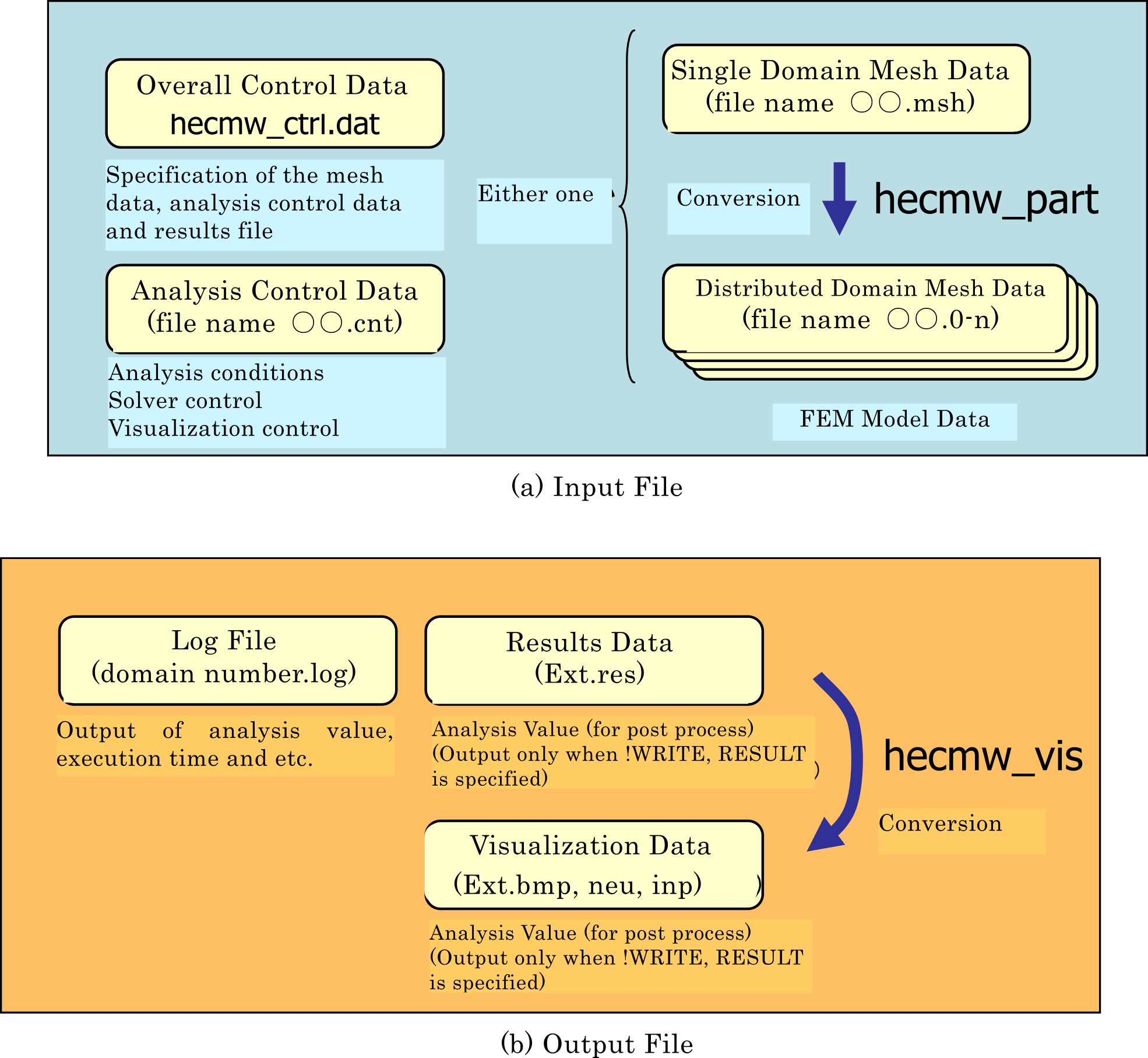
FrontISTR reads the following three types of input files.
- Overall control data (
hecmw_ctrl.dat): Specifies the input file names for the mesh data and analysis control data, and the output file names for result and visualization data. - Mesh data: Defines the finite element mesh, material data, section data, and group data. Use a single-domain mesh when analyzing on a single CPU, or distributed-domain meshes partitioned by
hecmw_part1when running in parallel on multiple CPUs. - Analysis control data: Defines the analysis type, boundary conditions, loads, solver control, and visualization control.
All of these are text files and can be created and edited with an editor. For the syntax used in each file, see Input Rules.
Output Files
When FrontISTR is run, the following files are output according to the analysis content and the specifications in the analysis control data.
- Message and log files: Output execution progress and summaries such as maximum/minimum values of displacement, strain, and stress, and the results of modal analysis.
- Analysis result files: When
!WRITE,RESULTis specified in the analysis control data, physical quantities for each node and element are output. They are used for post-processing and as input to other analyses. - Visualization files: When
!WRITE,VISUALis specified, data are output in a format for visualization tools.
The naming conventions and methods for checking output files are described in Serial Analysis and Parallel Analysis; details of the physical quantities and formats that can be output are given in Output and Restart.
Execution
Place fistr1 (fistr1.exe on Windows) in a directory on the path or in the directory containing the input files. Run the following command in the directory containing the input files to start a serial calculation.
The mesh data and analysis control data specified in hecmw_ctrl.dat are read, and the specified result and visualization files are output.
Parallel Execution
For parallel calculations, prepare an MPI-enabled fistr1 in advance and use distributed-domain meshes partitioned by hecmw_part1 as input. Execution follows the MPI runtime environment. An example using four domains is shown below.
The Windows binary packages include an MPI runtime, so parallel execution is possible without installing MPI separately. For details, see Installing Binary Packages. The concept of domain decomposition is described in Partitioning and Parallel Computing.
Up to Ver.3.x, only parallel contact analysis required a single-domain mesh as input; from Ver.5.x onward, parallel contact analysis uses distributed-domain meshes in the same way as other analyses.
See Also
- Serial Analysis — procedure for serial execution and checking output files.
- Parallel Analysis — procedure from partitioning through parallel execution.
- Input Rules — common syntax rules for input files.
- Output and Restart — physical quantities that can be output and the restart mechanism.
- Partitioning and Parallel Computing — partitioning for parallel computing.